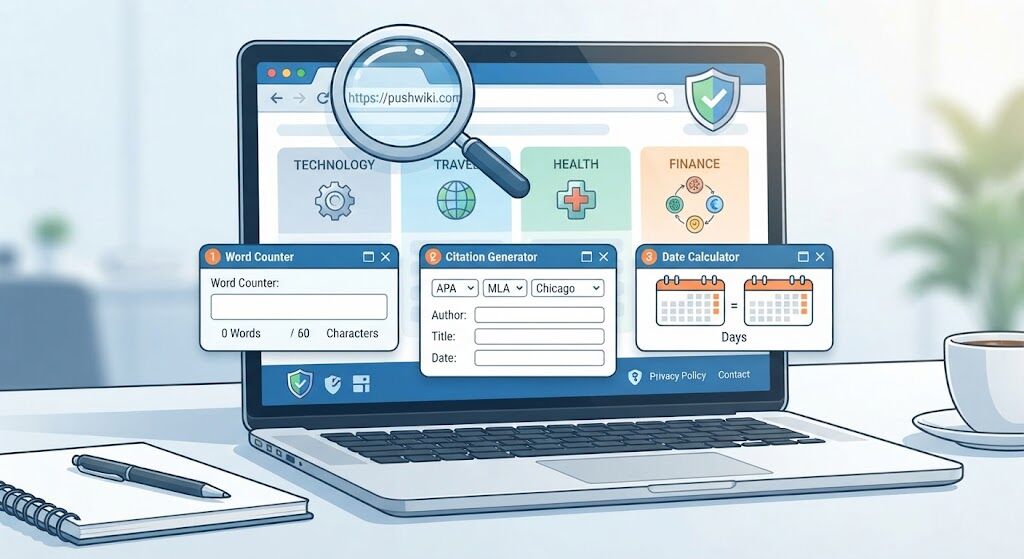
The website at pushwiki.com publishes articles on technology, travel, health, and finance. It also offers three free browser tools for counting words and characters, formatting citations, and comparing dates. The public guides are accessible without signing in, though some publisher disclosures still contain template text. Before following advice or sharing personal information on PushWiki Com, check who published the guide, what evidence supports it, and how the site handles your data.
What Can You Do With the Free Tools?
The Tools page says these utilities run in your browser and are available without registration. For a first try, use invented text or dates. This review examined the public tool pages and their stated features.
| Tool | What it does | What to check |
|---|---|---|
| Word counter | Reports a word count and character totals for text you enter. | Compare the character counter’s treatment of spaces with the limit for your field. |
| Citation generator | Formats the details you provide in APA, MLA, or Chicago style. | Check the author, title, publication date, and URL against the original source. |
| Date difference calculator | Shows the time between dates, including a weekday count. | Check whether the end date is included and whether a weekday count suits your task. |
Try an example you can verify by hand
Enter June 2 and June 9 of the same year. Seven days elapse between those dates. Selecting Include the end date should give you eight. The tool labels business days as Monday through Friday. For a deadline, check the original instructions for holidays and cutoff times before using a weekday total.
For a citation, start with a source you already have open. Copy its details into the formatter and compare the output with the original. Pay particular attention to the author and date, since those fields help someone else find the source later.
For a quick text check, enter “The library closes at six.” You should get five words. If you’re working to a character limit, compare the result with the count in the field where you’ll paste the text.
What Can You Verify About the Publisher?
The public pages below explain where readers can find publisher details. At the time of review, some of the fields were still unfinished.
| Page | What the review found | What you can check |
|---|---|---|
| About | Template fields for the operator’s name and background. | Look for a named operator or a linked author biography. |
| Contact | A contact form and a placeholder for the direct email address. | Check the current contact options before sending a correction. |
| Editorial Policy | Template text in the research section. | Look for citations or a description of the method in the individual article. |
| Privacy Policy | An unnamed newsletter provider and unfinished analytics disclosures. | Check the latest policy before submitting an email address. |
Why the gaps matter for health and finance
Google’s guidance puts trust at the center of E-E-A-T, which stands for experience, expertise, authoritativeness, and trustworthiness. It gives stronger weight to these qualities for topics that can significantly affect health, financial stability, or safety. Google calls these Your Money or Your Life, or YMYL, topics.
For a consequential claim, check the writer’s qualifications and follow the primary source. Look for the date, who the advice applies to, and the passage that supports it. Those details help you judge the individual article even when the publisher’s general disclosures are incomplete.
Also Read: ArcyArt Directory: Complete Review of Features, Safety, and How It Works
How to Browse PushWiki Com Safely
- Check the address. Read the entire hostname in the browser’s address bar. If you intended to visit
pushwiki.comand landed on a different domain, verify where you are before entering any details. - Check HTTPS. Use your browser’s connection information to confirm that the connection is encrypted. Exit the page immediately if a security warning appears in your browser. Assess the article’s sources separately.
- Review browser notifications. Decline permission if you only want to read. If you already allowed notifications in desktop Chrome, go to Settings → Privacy and security → Site settings → Notifications and block the site.
Frequently Asked Questions
Is an account required to read the site?
The public pages reviewed opened without signing in. The site offers a separate newsletter signup for readers who want email updates.
How can I report an inaccurate article?
Use the Contact page. Include the article address, identify the claim that needs correcting, and provide the source that supports the correction.
Can I cite a guide for schoolwork?
Follow your instructor’s rules. If a guide refers to a study or report you plan to rely on, open that document and cite it directly. Cite the guide itself when discussing its wording or conclusions.
Conclusion
Use the site to explore a topic or try a simple calculation with sample inputs. Before following consequential advice or sharing personal details, check the address, the publisher’s disclosures, and the evidence behind the claim.